License
Any user who wants to use the Weiyu system, whether Community Edition, Enterprise Edition or Platform Edition (except Source Code Edition), needs to apply for a licenseKey. This document will provide detailed instructions on how to obtain and configure the licenseKey.
How to Apply for licenseKey
How to Get
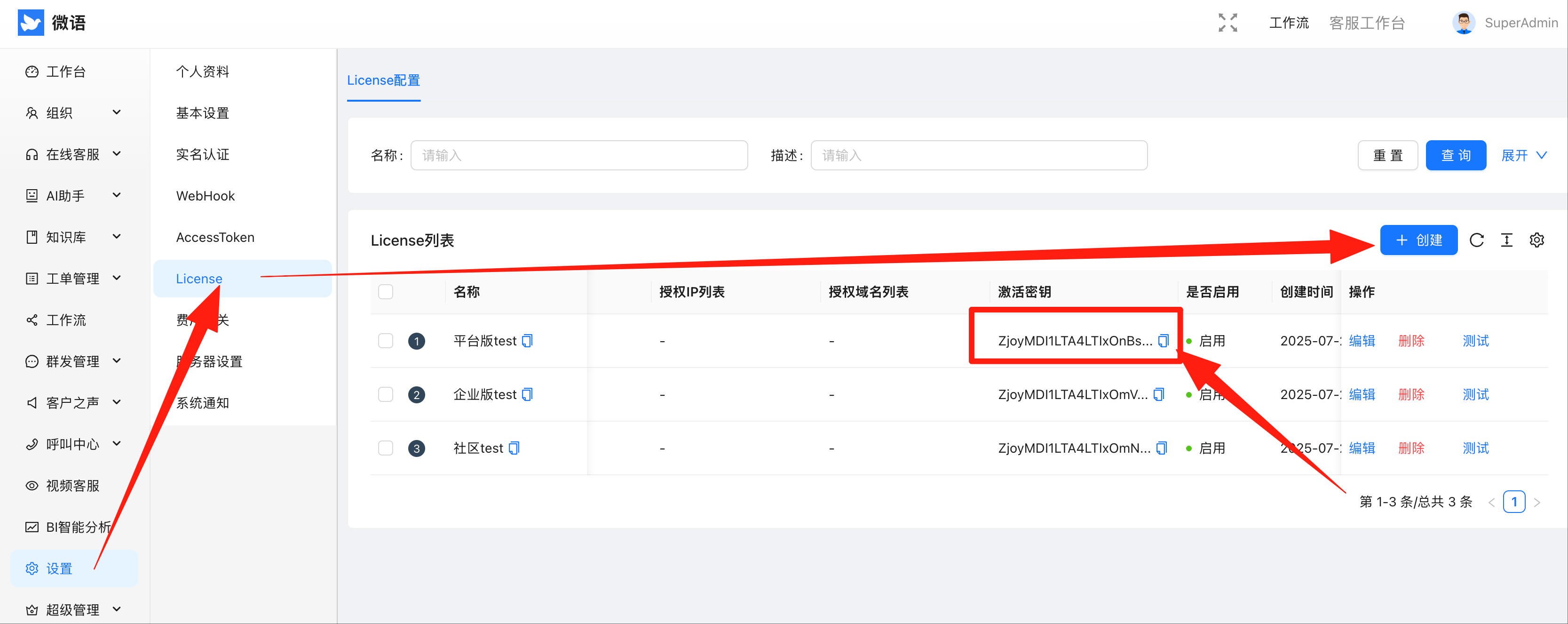
- Use your mobile number to log in to the official Weiyu Admin Backend
- Click Settings -> License Management
- You can get the trial version license
- Find the Activation Key, copy and paste it into the configuration file.
Configure licenseKey
After obtaining the licenseKey, you need to add it to the configuration file:
Properties Configuration File
# Add to application.properties or application.yml
bytedesk.licenseKey=your_license_key_here
Docker Compose Configuration File
version: '3.8'
services:
  bytedesk:
    image: bytedesk/bytedesk:latest
    environment:
      - BYTEDESK_LICENSE_KEY=your_license_key_here
    # ... other configurations
Environment Variable Configuration
# Linux/Mac
export BYTEDESK_LICENSE_KEY=your_license_key_here

# Windows
set BYTEDESK_LICENSE_KEY=your_license_key_here
Important Notes
- LicenseKey is valid for 30 days, you need to reapply after expiration
- Please keep your licenseKey safe and do not share it with others
- For official Enterprise Edition or Platform Edition licenseKey, please contact customer service for official authorization
Common Questions
Q: What are the requirements for applying for a license? A: You only need to register with your mobile number on the Weiyu admin backend to apply for a trial version license.
Q: What if the license expires? A: Log in to the admin backend again and get it again from the License Management page.
Q: Why do free open source projects need licenseKey? A: Considering that customer service systems may be used for fraud and other illegal activities, licenseKey is implemented to prevent such behaviors. Users are also required to keep their own key safe to prevent misuse.